Ticker Window Plugin for RPG Maker MV
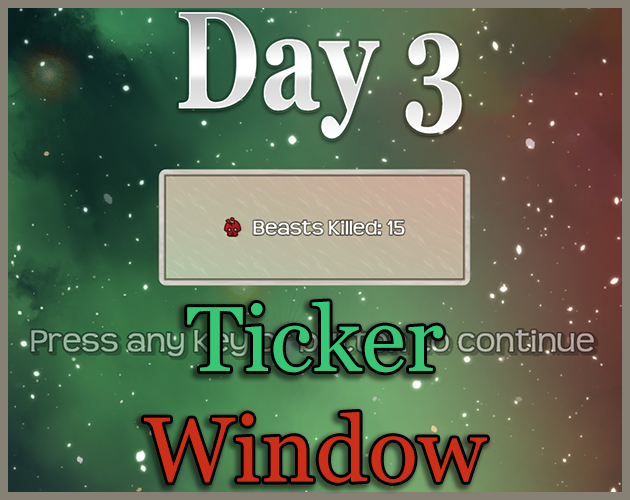
This plugin adds a custom menu scene for viewing pictures via items. It can be used to build an art gallery that the player unlocks throughout the game (easy to accomplish with hidden items), to create 'picture books' that the player can page through, or any number of scenarios where you want to associate items with picture images for the player to view. The scene is accessed from the main menu and allows the player to view art or cancel and return to the main menu.
Instructions
To use this plugin, simply install it configure the plugin parameters to your choosing. this plugin is lightweight and adds new custom windows and functions to your game, so it is unlikely (although not impossible of course) that it will conflict with anything.
Parameters
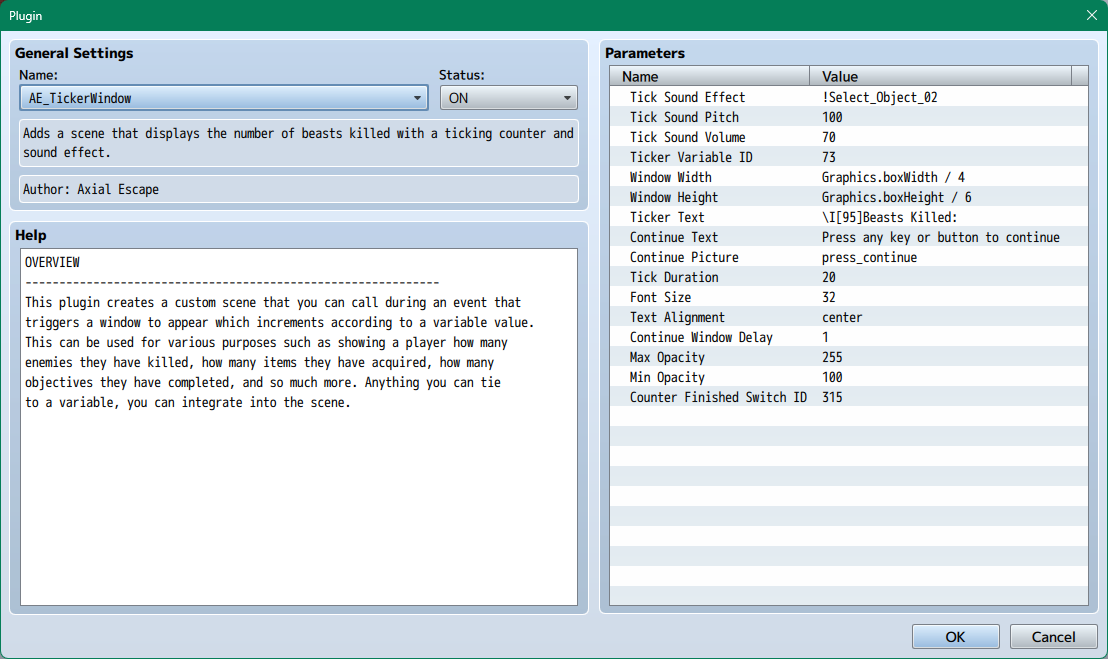
This plugin has several parameters to configure.
- Tick Sound Effect
- The sound effect to play for each tick.
- Tick Sound Pitch
- The pitch of the tick sound effect.
- Tick Sound Volume
- The volume of the tick sound effect.
- Ticker Variable ID
- The variable ID that stores the value you want to show.
- Window Width
- The width of the counter window. Use formula, e.g., Graphics.boxWidth / 2
- Window Height
- The height of the counter window. Use formula, e.g., Graphics.boxHeight / 2
- Ticker Text
- The text displayed before the ticker window appears with your chosen variable.
- Continue Text
- The text displayed when the ticker is finished.
- Continue Picture
- The picture to display when the ticker is finished. Select from the pictures folder.
- Tick Duration
- The duration of each tick in frames.
- Font Size
- The font size of the text in the counter window.
- Text Alignment
- The alignment of the text in the counter window. Options: left, center, right
- Continue Window Delay
- The delay in seconds before the continue picture appears.
- Max Opacity
- The maximum opacity of the breathing effect on the picture
- Min Opacity
- The minimum opacity of the breathing effect on the picture.
- Counter Finished Switch
- The switch ID that will be turned ON when the counter is finished.
Terms of Use
This code is under the MIT license. You are free to use this plugin in any game, commercial or not (18+ games are fine too). You must credit Axial Escape in your project if you plan to release commercially. You are free to extend and make changes to the code base. Thank you!
Why does this plugin require payment?
I'm an indie dev myself using RPG Maker MV (I'm developing Born In Reverie on Steam). As you know, developing a years-long project can be a massive undertaking, financially, emotionally, physically, etc. I work with some badass RPG Maker community members to help develop my project, and I'm super happy to support them all financially. And now... I'm trying to support myself financially! I refuse to compromise on the quality of my own art, and I refuse to do anything less than support all the contractors I work with to the best of my financial ability. Buuuuut I'm still a team of one trying my best to make ends meet at the end of the day, so anything helps! I use all my plugins myself and I ain't going anywhere, so you can rest easy knowing I'll continue to support these and update them in years to come.
Thanks
-Taylor
Purchase
In order to download this tool you must purchase it at or above the minimum price of $0.60 USD. You will get access to the following files:

Leave a comment
Log in with itch.io to leave a comment.